Modern development frequently involves choosing libraries to use. The obvious criteria is does it solve the problem, but that will leave a short list of candidates.
The descriminant should be how easy is it to test.
Random outpourings of a software developer
I have spent the last couple of days fighting with oauth 2.
This is based upon Cognito.
The basis of the oauth authentication is a multi step dance. First you get the user to log in and are redirected back with a code. You need to send back the code with some shared secrets and it responds with a set of tokens.
These tokens do include the refresh token despite the docs saying that they don’t.
The next step is to fetch some user details. This has not yet been implemented yet the docs clearly state that it is there.
I have yet to find the renewal endpoint…
Update…
I have found out why cognito does not implement the ouath/userinfo endpoint.
It’s because the tokens endpoint returns a JWT token that includes the userinfo. I have yet to see if this is the most sane Bearer authentication token.
I have finally found a decent pattern to test promises.
You can mock a service to return Promise.resolve(x) or Promise.reject(“reason”).
Sample is from contentful-to-neo4j
test(“If contentful is empty then nothing is sent to the db”, (done) => {const contentfulService=mockContentfulServiceFactory();const neo4jService=mockNeo4jServiceFactory();const log=mockLogFactory();const systemService=mockSystemServiceFactory();contentfulService.getAssets.mockReturnValue( Promise.resolve(contentfulService.emptyResult));contentfulService.getEntries.mockReturnValue( Promise.resolve(contentfulService.emptyResult));const transformService=transformServiceFactory(contentfulService, neo4jService, contentfulBatchSize, log, systemService);transformService.copyContentfulSpaceToNeo4j();setTimeout( () => {expect(contentfulService.getAssets.mock.calls.length).toEqual(1);expect(contentfulService.getEntries.mock.calls.length).toEqual(1);expect(neo4jService.cypherCommand.mock.calls.length).toEqual(0);done();},1);});
I have now stabilised the contentful-to-neo4j project. It should be able to handle most contentful spaces. I still need to tune the transactions for very large datasets – but have no errors yet.
It has gone from being a simple script to an application that has 100% code coverage. I have learnt a lot about javascript Promises and how to test in Jest.
Here are some useful neo4j queries:
Find out how many of each content type that you have published:
MATCH (n) WHERE n.contenttype IS NOT NULL
RETURN n.contenttype, COUNT(n)
ORDER BY n.contenttype
You need to remember that nodes are circular and need to be surrounded by ()
Find pages that share slugs:
MATCH (a {slug:’common-url’}) RETURN a
Find nodes that have a slug with a specific ending:
MATCH (n) WHERE n.slug ENDS WITH ‘-kr’ RETURN DISTINCT n
Find assets that are not referenced by a content type:
MATCH (image {cmstype: ‘Asset’})
WHERE NOT (image)-[]-()
RETURN image
Simple search for orphans:
MATCH (a) WHERE NOT (a)-[]-() RETURN a
These are simple queries in Neo4j that would be hard to do in the Contentful UI.
I have just updated my contentful-to-neo4j project so that it will by default work on a graphene database hosted in Heroku.
Steps to get this working:
Clone the repo:
git clone https://github.com/chriseyre2000/contentful-to-neo4j
Sign up to heroku, add a credit card, create an empty heroku app.
Add the free graphene db addon (assuming that you have less than 1000 content types).
Install the heroku cli
Open a terminal in the directory that you checked out the repo.
This may require you to login to heroku on the cli.
heroku git:remote -a YOUR_APP_NAME
set the two keys that identify the contentful space:
SPACE_ID

CONTENTFUL_ACCESS_TOKEN
Once the app has finished restarting:
heroku run loader -a YOUR_APP_NAME
You should now have a full populate graphene database.
You may need to move to a paid tier big enough for your contentful space…
This is surprisingly painless. I only had to add environment variable fallbacks and a Procfile.
This article introduces Contentful ( a cloud hosted, headless, Content Management System (CMS)) and the graph database Neo4j. I have written a utility that allows data stored in Contentful to be imported into a Neo4j graph database. I’ll leave detailed explanations of what this can do until after I have explained the two systems. There are probably very few people who are familiar with both of these products so I will start with an introduction to each.
Contentful is a cloud hosted headless CMS.
Contentful does provide a user-interface for the content editors:

This is how the editors enter the various fields that make up a content type.
However Contentful does not provide a user interface for the “application”. Instead it provides various api’s that allow the developer to use the data in the CMS however they like. This is very powerful in that you are not limited by the user interface provided by a traditional CMS – you get to use it however you like. Given that the data is served by a rest api (with GraphQL coming soon) then you are not restricted by language.
Data in contentful is partitioned into Spaces. This is the equivalent of a distinct database.
Spaces contain three kinds of things:
Entries and Assets can be in preview or published states. There are two main api feeds preview and publish. Publish shows only published items, where as preview will also include more recent items that are in preview mode.
The contentful space that I am using for my examples is “The example project” which you get by default when you sign up to contentful. It is the content for a website that explains how to use Contentful from a number of programming languages.
Here are the content types within this space:

Creating a user interface for these is beyond the scope of this article but you can find plenty of examples.
Neo4j is a graph database.
Unlike traditional relational databases it works with nodes and relationships.
Nodes are the entities of the system and may have a label and attributes.
Nodes may be connected by relationships (which can be directional). Relationships can also have attributes.
You can query a neo4j database using a query language called Cypher.
Neo4j also has an api that allows other systems to connect to it – these can be used to query and modify the graph.

Here I have written one of the simplest queries possible in neo4j:
MATCH (a:category) RETURN a
This is find me all nodes of label category and return them. Here I have shown the details of one of the nodes in the browser.
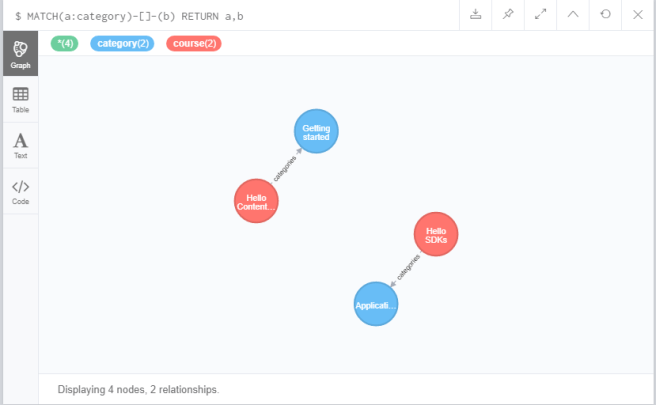
This is a more complex query:
MATCH(a:category)-[]-(b) RETURN a, b
This reads find me all nodes that are categories that have any kind of relationship to another node and return these nodes.
Note the visual nature of the query language. Nodes are contained in normal brackets but are displayed as circles in the browser!
There is far more that can be done with Neo4j and Cypher but this is a good introduction.
Now I have introduced the two platforms I will explain how to move data from Contentful to Neo4j.
There are some warnings I should give you before you start to use it.
I typically use Neo4j for analytical databases that get dropped and recreated frequently. This may vary from other peoples usage. This means that I don’t need to worry about database backups or migrations. I do need to worry about loading the database quickly.
My utility is available in the following github repo:
https://github.com/chriseyre2000/contentful-to-neo4j
The utility is written in javascript and uses node to run the command. There are detailed instructions in the readme. I chose Javascript for this as this seems to be the most commonly used language for Contentful.

Here is what you get when you ask for all data (note in a realistically sized contentful system neo4j would cap the displayed nodes a 100).
This shows the relationships between the various nodes in the system.
Here is the schema of the graph database:

This shows the relationships between the various content types.
This is fun to play with and with more detailed queries can be informative.
However there are more powerful queries such as:

This returns the asset nodes that are not linked to by any entry. These are orphan images that may have been published by mistake. This is something that the contentful UI cannot do.
You can also view the data in text form:
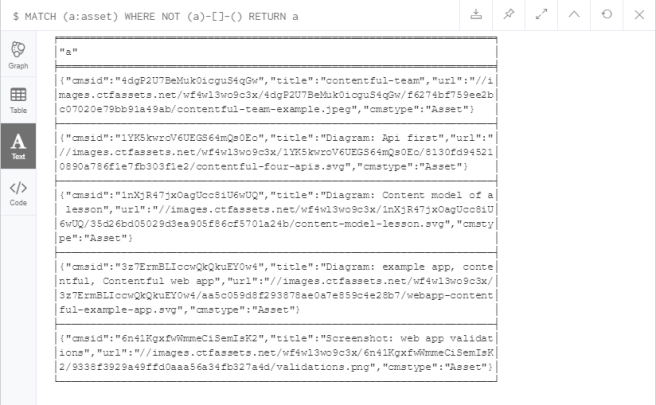
Hopefully this has given you a useful insight into what Contentful and Neo4j can be used for. Feel free to use my utility (at your own risk). It does make managing a Contentful system considerably easier – given that you can freely query the data.
I have now completed a minimal version of the mapping tool.
The code can be found in this github repo:
https://github.com/chriseyre2000/contentful-to-neo4j
There are some warnings before you use this script:
I can’t guarantee that it will work with all Contentful spaces yet. So far I have only tested it on the demo space that comes when you sign up for a free Contentful account.
If you do have problems please send me either a pull request or a failing test case (show me the schema of the problem content type).
Once you have the neo4j database populated it becomes trivial to find orphaned items. I’ll add some useful samples queries to the documentation.
In my previous post I mentioned that I am trying to write to Neo4j from node.
This is becoming difficult as each of the top two libraries seems to have serious dependency problems.
The Neo4j package does not handle error conditions well due to a missing stacktrace function.
The neo4j-driver package is also broken with a vague “Headers is not defined”.
This brings me to the main topic: when should you choose a library versus directly using an api?
Firstly does the library do the job? There are lot of node packages out there. Some of them are useful.
If the library adds some features then it’s a no-brainer. Especially if the library can maintain a stable contract despite the underlying api changing (The Delphi VCL was a great example of this. The VCL survived the underlying platform moving from 16 to 32 bit without any code changes required).
There is also the matter of the dependency chain that you will pick up with the library. It’s not uncommon for a npm package to have tens of dependencies. This can mean that a poorly maintained library can be broken by someone else’s change (this may be less of a problem with the introduction of package-lock). This can also be difficult with dependencies from multiple required libraries: these can clash and you may have to chose which bugs you can live with.
If the usage that you have of an api is simple and the api is stable it may be worth directly calling just the parts that you need.
Contentful is a really effective headless CMS. It’s api does have some limits (you can only query user defined fields across a single type at a time).
A few years ago I managed to find a way of mapping a contentful space into a Neo4j graph database. This allows full querying of the data in contentful. This can be useful for finding where a given image is in use or finding pages that are orphaned.
I am now trying to recreate this library as an open source node project.
I have started by creating a free contentful account (provided I only have one space and live within the limits this will be fine for my purposes).
To query contentful I am using the contentful npm package.
So far I can query the assets and content types in my space.
Initially I am going to use a local version of neo4j but will be moving to a Heroku hosted version. Neo4j community 1.1.6
I’ll add to this series as I progress.
I have been having fun recently working on a react app. Typically I use TDD.
This can be difficult when you have code that goes:
fetch.then(res => json)
.then(res => this.setState(res.aValue)
 )
Testing this gets awkward. Changing the signature is too invasive. You can easily mock the fetch but get a race condition reading the state.
This is the solution that I found works. By abusing the javascript sequencing a bit – do what you need to then check this:
setTimeout(() => { assert thing.state}, 0)
 Developer Rants