Designing Elixir Systems With OTP – Part Four

I am again working through this book.

I started again with the real edition. The major change is that it is now focused on Worker Bees rather than Wildabeast’s.

So far I have made it to the testing chapter at the end of part one.

It appears that the samples have not been updated to match the latest code.

The testing techniques are really good. Given that variables are immutable then test fixtures really are reusable. The context part of ExUnit is very clear.

I understand delaying the tests to keep the book to a reasonable length, but event a single character typo can break functionality and be hard to fix later. I had misspelt the key on a lookup and though that the tests were broken.

Here is the current state https://github.com/chriseyre2000/mastery at f4d9f35

What is Normal? Part two

This is a follow up to part one

I have made some more progress on this project and we are now down to 60 errors per day from the previous thousand. Given that we are integrating with other a hundred system this is more acceptable. Once a breakthrough was made to clear the highest frequency problem, the rest were fixed easily.

A lot of the existing log messages lacked context. They typically included what method was being used and the stacktrace. What was missing was enough information to recreate the problem.

My previous claim about not using a debugger no longer stands. I was forced to use this to identify paths through some code that had not been developed via TDD (it had some acceptance tests but the details were obscured). We are still removing the old Betamax tests – these consisted of recordings of a production run that are replayed. This is a good start, but is painful to adapt.

Types of Standup

Most agile teams following some form of Scrum hold a daily standup.

Typically this is held in the morning at a time when the whole team can be in. I have also heard of end of day standups. These work better for teams that work remotly across timezones.

There are several forms of this meeting.

The basic is the three questions:

– What did you do yesterday

– What are you going to do today

– Any blockers

Another that I prefer is to walk the project board from right to left. Duscuss all cards that are not yet done. This will ensure that the board is upto date plus can show when someone is working off the plan.

I have also worked on a team that held two standups a day. A full one in the morning and a second quick version after lunch to cover changes.

Using Wardley Maps to Document a Software Architecture

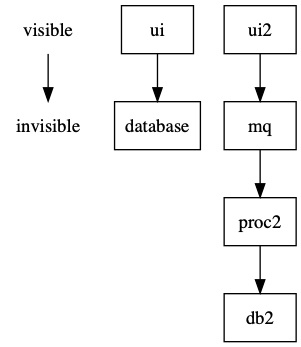
I recently saw a tweet with a diagram using the wardley map value chains to document some software.

This looks to be an interesting way of viewing a set of products.

Given my use of graphviz I thought that I would give it a go.

Here is the repo: https://github.com/chriseyre2000/diagrams

Wardley Map visualisation of a set of software products.

This includes the dot file for the above diagram.

The idea of the value stream is to show the dependencies from the visible to the invisible. The horizontal axis has the custom items on the left and the commodity ones on the right.

I will be experimenting with this for a while.

Using Tampermonkey to Customise a Website

This is a demonstration of the power of the Tampermonkey extension to Chrome.

My employer, Codurance, have a page on their website listing the current staff:

https://codurance.com/about-us/our-people/

Now it would be useful to know how many people we have listed.

If you were to visit that page, select inspect and type the following into the console of the browser:

$('div.g-max-width-800').length

This will return the count.

This is a start.

The next step is to make this more visible.

Install the Tampermonkey extension into Chrome.

This will add the following icon to your browser:

Tampermonkey icon

Visit the page you want to customise: https://codurance.com/about-us/our-people/

Press the tampermonkey icon

Select Create a new script

This will give you a script that looks like this:

// ==UserScript==
// @name New Userscript
// @namespace http://tampermonkey.net/
// @version 0.1
// @description try to take over the world!
// @author You
// @match https://codurance.com/about-us/our-people/
// @grant none
// ==/UserScript==
(function() {
‘use strict’;
// Your code here...
})();

Now replace // Your code here… with:

$(‘div.u-heading-v2-3–bottom h2’).text( ‘The Team (‘ + $(‘div.g-max-width-800’).length + ‘)’ );

Save this and view the page.

This will when you revisit the page change the label to include a count of how many people we have.

This is a great way to make small changes to a website that you don’t control.

If you want to allow other people to use an updateable script then you can publish the script on a public url and use the settings tab to record where it comes from.

This technique is great for customising third party websites that don’t quite do what you want them to. You can even add javascript dependencies into the page if you want to use them.

This results in this (numbers will vary):

Most frequently used commands

I was just thinking about the most frequently used commands that I use on my main development machine. It did not take me long to work out how to automate this process. My history has the last 10000 commands:


history | awk '{print $2}' | sort | uniq -c | sort -r | head -n 20 | awk '{print $2}' 

Here is the output

git

cd

exercism

cat

curl

docker

yarn

vim

grep

npm

rm

ls

docker-compose

mix

open

./gradlew

mkdir

code

cp

brew

This is a giveaway that I am a mac user, work with groovy, node and elixir. I also do some work in docker and use a mixture of vim and code.

I’d be interested to see what other people have

A Year With Dependabot

I have been working with a build pipeline using dependabot this year. At the start of 2019 I took over as team lead on a project. My predecessor had enabled dependabot across the teams pool of repositories. After some pruning we have around 60 of these.

Dependabot is an attempt to solve the upgrade cycle for third party dependencies. It will create a pull request for each new version. If you have a build server configured to run tests that you trust then you can get dependabot to auto merge the passing changes.

The year started with a backlog of 360 PRs. Early in the year I spent the first part of each morning ensuring that almost all of the projects have at least a test pipeline..

This started to make an impact on the backlog. We then encountered our first react update. This added 70 PRs overnight.

One pair on my team automated the deployment of the react libraries to our CDN. This eventually helped (we did have a fun problem with the first bad deploy – if you deploy a bad version of a library to a CDN then its painful to correct – some users will have that version cached potentially forever).

We also needed to restart a lot of broken builds. CD is great but sometimes.cloud infrastructure just fails

Dependabot has a helpful interface in that it has an agent that responds to comments on a PR. This allows you to tell it to rebase/recreate/ignore/merge things.

This week we got the PR total down to 12 by the end of one day. The next day Babel released a new version so we jumped to 70 …

We will never win this race but Dependabot does help keep the code upto date. Note we also get updates from other teams in the organisation. One morning during planning we were able to report that a change we had been waiting on had been released, tested and merged in the time we were meeting.

I have had to raise a few issues with Dependabot support and they did fix them quickly. They had not experienced organisations with over a thousand repos before which made the configuration UI slow – this in now much better.

Our setup of Dependabot, Jenkins and Github did not react well to the introduction of Snyk to the system. Snyk tells Github that it is happy with the security of the dependencies. The problem was this was faster than Jenkins telling Github that it had started testing the change! Dependabot then saw a PR with an ok stamp and then merged the change. We had a fun few days reverting broken builds until we tamed that one.

During the year Dependabot was bought by GitHub and is now free to use.

For now I have disabled Snyk on our projects but will investigate it further in the new year (it appears less configurable than Dependabot).

Here’s to another year of upto date dependencies.