Here is an interesting article on using Protobuf for RPC in Elixir:
https://blog.appsignal.com/2020/03/24/how-to-use-grpc-in-elixir.html
The practical advantage of Protobuf is that it provides a sane wire protocol that is language independent.
Author: chriseyre2000
Quickly build a backend from a Postgres DB
This looks to be an interesting project:
Interesting Video on ETS
Taming Dependabot
I gave a talk at Skillsmatter Cloud Native Exchange.
Here is the link: https://skillsmatter.com/skillscasts/14913-taming-dependabot-keeping-microservices-up-to-date
Kafkaesque Support from Barclaycard
I am currently trying to get a problem resolved with Barclaycard.
A few years ago a fraudster tried to steal my Barclaycard using the Barclaycard call centre. The first time triggered the fraud protection and my card was blocked. That time I added a password for changes to my account.
A month later the same thing happened and the call centre allowed the change despite the requirement of the password (it was not guessed, just sidestepped). The fraud team again caught the problem and blocked the card. It was during the conversations that I had with the fraud department that convinced me that they really did not understand security. They were about to read out an address line attached to the account before I had verified myself (I stopped them). A month later that would have been a GDPR violation.
It required a distinct call the next day to close down my Barclaycard as whilst blocked no action can be taken (all calls related to a blocked card get routed to the fraud department and they don’t deal with card closures).
Some years later I have found that Barclaycard had sent the address that they knew was fraudulent to a Credit Agency as a “confirmed address”. This is something that only Barclaycard can correct. I called the support number and was put eventually got through to the fraud detection team. I asked that the invalid address be removed.
A month later nothing had changed. I had no confirmation of my first communication and had started to be billed for the credit checking service that I am now using.
This is when I looked up the email address of the CEO of Barclaycard to make my complaint. They did get back to me the same day with a reference number and asked for my availability to take a call. I gave a few hours that day and most of the following.
There was no call back 2 days later, so I chased via Twitter. Now I find that the availability details were for the next 5 days!
It’s now a week from the email so I chased up via twitter. This time I am told that a letter has been sent and given the phone number that the letter asks me to call. The first time the call was lost after 15 mins. The second time it rang for 2 hours.
Again I chased via twitter. This time I was told that a specialist case handler has been assigned, but may not be able to get back to me until next week! Apparently the people at the number I have been given would not be able to help me anyway!
This is slowly turning into a Kafkaesque nightmare. What is the point of sending a letter with a phone number that:
- Won’t be answered in under 2 hours
- Won’t be able to help anyway.
I have so far been waiting (in total) for 3 hours for the calls to be answered, and now I find that they can’t help yet.
Hopefully I will get a call next week.
Referencing other module in Elixir
There are several different ways of referencing a function in another module.
The direct:
MyModule.SubModule.hello
You can also alias the module so that a shorter name can be used:
alias MyModule.SubModuleSubmodule.hello
You can import a module so that all the functions are treated as local to this module:
import MyModule.SubModulehello
You can require a module so that you can use the macros defined in that module.
You can use a module to run the __using__ function from that module in your context.
These don’t have to be at the top of the module, you can use them within a function to restrict scope (not so sure about using __using__ this way…).
These also have parameterized versions so that you can choose what to import (only some, exclude some, rename them).
This can make them seem complex …
Again working though Programming Phoenix
I am now on my third pass through this book.
The first time through it was still in beta.
The second was at the first release.
Now I am working on the >= 1.4 Version
Here is the repo that I am working on (now at Chapter 6):
https://github.com/chriseyre2000/rumbl
You need to note that sometime you need to edit the code *before* running the ecto.migrate command that prompts you in the console.
The new structure of a Phoenix app is much cleaner. Keeping the domain and the site in the same project helps. The scaffolding is amazing.
For those that don’t know, Phoenix is Elixir’s answer to Ruby On Rails.
That means that it is both an MVC Framework and an associated set of code generators that allow scaffolding of the site. It defaults to using Postgres as a database, but given that the data access uses the wonderful Ecto framework you get migrations and a data access layer.
Phoenix Liveview reminds me of Delphi
This is a very odd resemblance, but the feel of adding a form to Liveview resembles the simplicity of good old Delphi. You get a single place where you can define the layout and the actions (achieving high coherence) without the concerns getting in each others way.
Getting started with Elixir Phoenix using Docker
I am working through the Grox.io course on Phoenix Liveview.
Having come back to this after a while I had forgotten the database setup.
Here is what I have reconstructed, using Docker:
docker run -d -e POSTGRES_PASSWORD=postgres -p 5432:5432 postgres:11
mix ecto.create
mix phx.server
This enabled me to get started again.
Processes in Iex
The Elixir iex shell is a very powerful tool in itself.
I have recently found a trick that makes it much easier to use. If you get stuck in a line that you just can’t complete just type :break + return and it will cancel that line.
This is an investigation of what you get out of the box.
Lets start with the processes that exist in an empty iex session:
iex > Process.list |> Enum.count
56
Process.registered |> Enum.count
33
That means that there are 33 named processes started with iex and 23 anonymous ones.
Here are the named ones:
Elixir.IEx.Broker - GenServer, communicates with other components.
Elixir.IEx.Config - Agent, handles .iex.config file
Elixir.IEx.Pry - GenServer, Handles Pry debugging
Elixir.IEx.Supervisor - Supervisor for the above three Services.
Elixir.Logger, Service for logging, works with logger.
Elixir.Logger.BackendSupervisor, Supervises the backend for the logger
Elixir.Logger.Supervisor - Supervisor for the logger components
application_controller - GenServer, handles loaded applications
code_server - Erlang code server
elixir_code_server - GenServer that manages loaded code in ets
elixir_config - GenServer that stores config in ets
elixir_sup - Supervisor for the above two GenServers
erl_prim_loader
erl_signal_server
erts_code_purger
file_server_2
global_group
global_name_server
inet_db
init
kernel_refc
kernel_safe_sup
kernel_sup
logger - Erlang logger service, used by Elixir.Logger
logger_handler_watcher
logger_proxy
logger_sup
rex
socket_registry
standard_error
standard_error_sup
user
user_drv
We have the following applications loaded:
iex > :application_controller.loaded_applications
[
  {:logger, 'logger', '1.10.4'},
  {:iex, 'iex', '1.10.4'},
  {:compiler, 'ERTS  CXC 138 10', '7.6.2'},
  {:elixir, 'elixir', '1.10.4'},
  {:stdlib, 'ERTS  CXC 138 10', '3.13'},
  {:kernel, 'ERTS  CXC 138 10', '7.0'}
]

You can find out more using :observer.start
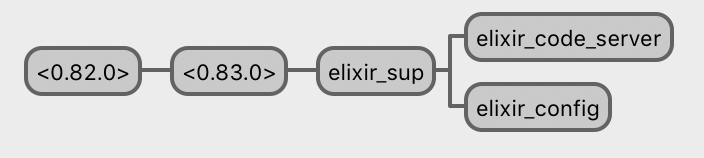


These cover 43 of the Processes
I have 13 to track down.

